Kids need safe, creative ways to learn and play, but parents worry about mess, wasted paper, or broken crayons and markers.
LCD writing tablets offer a clean, reusable drawing and writing experience. They allow children to sketch, practice handwriting, and express creativity without paper waste, ink smudges, or digital distractions.
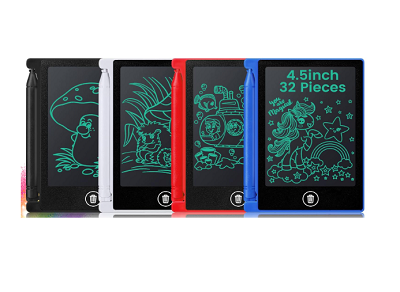 lcd writing tablet for kids
When I first gave my child an LCD writing tablet, she used it for drawing, spelling, and making simple lists. No mess, no wasted pages, and easy erasing kept her happy and me relaxed. If you are worried about creative clutter or want a smart learning tool, read on to see how LCD tablets can fit your child's needs.
Is an LCD writing tablet safe for children to use?
Many parents ask whether LCD tablets are safe for young kids, and if there are risks similar to other electronics or art supplies.
LCD writing tablets are designed to be safe for children. They have no radiation, no ink or dust, and often feature sturdy, rounded cases, making them a better choice over traditional drawing options.
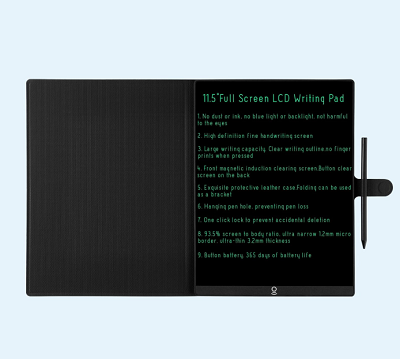 safe lcd tablet for kids
The first time I checked my daughter's tablet, I was relieved to see thick plastic, smooth edges, and no tiny parts to swallow. Most brands use ABS plastic, which is tough and does not crack. There are no electric screens, glowing lights, or sharp styluses. Many tablets use button cell batteries only for erasing, which last months and are usually locked inside the case.
Comparing safety features in LCD tablets for kids
You can compare tablet safety by looking at the design, material, battery security, and certifications. Here is what I found makes the best picks for families:
| Safety Feature |
Traditional Pads |
LCD Writing Tablet |
| Ink / Dust |
Yes, often messy |
None |
| Radiation / Blue Light |
Possible on screens |
None |
| Sharp Parts |
Occasionally |
Rare, stylus usually rounded |
| Battery Safety |
N/A |
Enclosed, secured case |
| Durability |
Tears easily |
Tough ABS, drop-resistant |
| Age Suitability |
5+ typically |
Some designs safe for 3+ |
I always check for certifications like CE, RoHS, or CPC before buying any model for my kids or recommending them to other parents. Safe LCD writing tablets eliminate the usual risks of art at home and school.
Does an LCD writing tablet encourage creativity and learning for kids?
Parents hope these electronic pads spark creativity, not replace imagination. So, does an LCD writing tablet help children explore and learn?
LCD writing tablets help children practice drawing, writing, and math without fear of mistakes. The instant erase button gives kids freedom to experiment, while keeping hands and rooms clean.
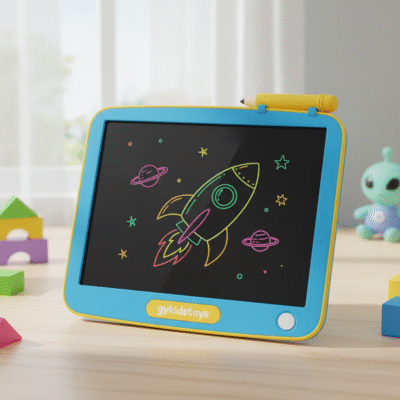 creative learning lcd tablet
My daughter used her LCD tablet for doodling, learning to write, and even simple math. She drew animals, tried fancy letters, and erased her mistakes with a smile. I noticed she started spending more time on numbers and spelling because there was no wasted paper. She could redo her work easily.
Exploring creative potential and learning tools
The clean slate nature of LCD tablets is exciting for kids. Mistakes are easy to fix, so children stretch their ideas. Tablets help them practice:
- Drawing shapes, animals, patterns
- Letter and number writing
- Math homework
- Spelling new words
- Maps and diagrams
- Quick games: tic-tac-toe, hangman, lists
| Activity |
Traditional Option |
LCD Tablet Advantage |
| Drawing |
Paper, crayons |
No mess, easy erase |
| Spelling Practice |
Whiteboards, pens |
No stains, reusable surface |
| Math Exercises |
Worksheets |
Re-do sums, less anxiety |
| Puzzle Games |
Paper sheets |
Portable, instant reset |
I recommend parents use LCD tablets for practice and free play. It does not replace paper entirely, but it makes everyday creativity and learning more enjoyable.
What are the limits or downsides of LCD writing tablets for kids?
Some people wonder if there are hidden drawbacks to LCD writing tablets, like limiting art skills, saving work, or screen issues.
LCD writing tablets are not perfect. They only create simple black lines, do not save drawings automatically, and cannot be used for digital art or video. Kids lose work unless you take photos before erasing.
 lcd tablet limitations for kids
The first time my child wanted to save her drawing, I realized the tablet erases everything in one click. There is no storage, no cloud, and only basic line quality. If you want color, shading, or to share art, you need to snap photos. Advanced tablets with save or Bluetooth features cost much more.
Breaking down common limitations
Before buying, consider what might frustrate kids who use these tablets every day:
| Limit/Difficulty |
LCD Tablet Impact |
Workarounds |
| Only one color |
Black/grey lines only |
Snap photo, use paper |
| No save function |
Erased unless captured |
Use phone camera |
| No pressure sensitivity |
Line thickness fixed |
Try using paper for detail |
| No app sync |
Standalone device |
Import drawings via photo |
| No video/games |
Not a digital screen |
Use tablet or phone |
I remind parents that LCD tablets are for simple, quick sketches and practice. They’re not for professional art or archiving. For those needs, other devices work better.
Conclusion
LCD writing tablets give kids a safe, creative, and reusable tool for drawing and learning, though they can't save art or replace advanced devices.
